Which GitHub Copilot CLI Model Should You Use and When?
TL;DR
I used the LLM Council technique to have all 17 GitHub Copilot CLI models anonymously evaluate themselves and each other. Key findings:
- Opus models = deep reasoning, architecture decisions, “the expensive senior engineer”
- Sonnet models = balanced capability/speed, good default for most coding tasks
- Haiku / Mini models = fast execution for simple, well-defined tasks
- Codex models = precision coding and terminal-focused workflows
I turned the self-assessments into model selection instructions and validated them with test prompts. Result: simple file listings correctly delegated to Haiku 4.5; complex reasoning puzzles correctly escalated to more capable models.
Bottom line: Match model tier to task complexity—use fast/cheap models for 80% of straightforward tasks, escalate to reasoning models for the 20% that require deep thinking. This saves money and can be fully automated with agent instructions.
Introduction
I have been using the Github Copilot CLI for a while now, and I have noticed that there are several different AI models available within the tool, but I noticed that I have been using a limited list of available models.
If you want to see which models you are using check out this great vscode extension called “GitHub Copilot Token Tracker” by Rob Bos.
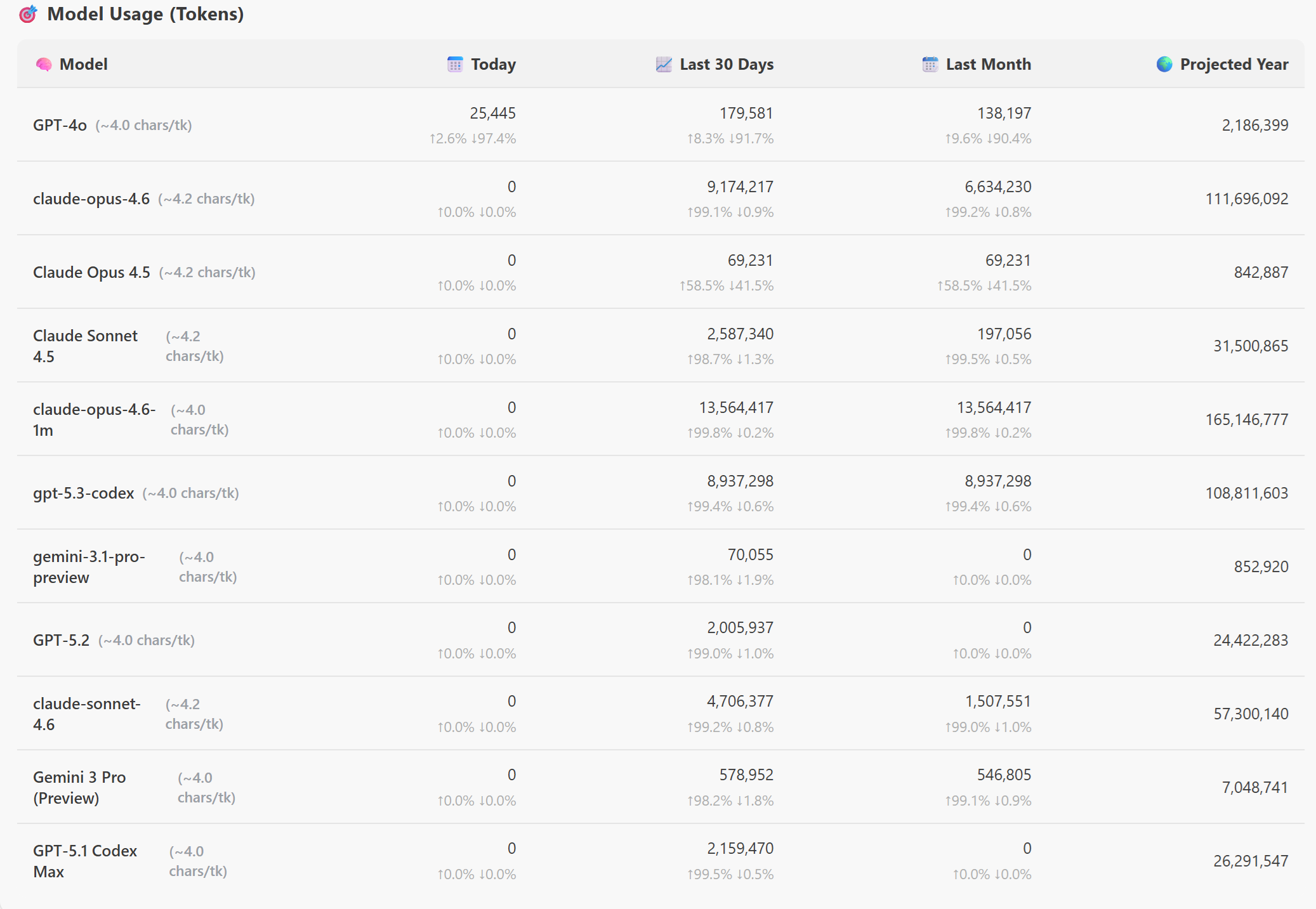
As you see the top 3 models I have been using are: ` claude-opus-4.6, claude-opus-4.5, and gpt-5.3-codex`. I have been using these models for a while now, but I have never really thought about why I am using them, and when I should be using other models.
The Experiment
To find out which model is best for which use case, I decided to conduct an experiment. I asked the 17 AI models to judge each other anonymously, to understand their strengths, ideal use cases, and how they collaborate with other models. Here is the current available list of models in the GitHub Copilot CLI:

To evaluate this, I used the LLM Council technique shared by Andrej Karpathy, which sends a query to multiple LLMs, it then asks them to review and rank each other’s work, and finally a Chairman LLM produces the final response.
Here’s what I did: I gave every model in GitHub Copilot CLI the same prompt, and used Claude Opus 4.6 as the Chairman. The prompt asked them to describe their strengths, weaknesses, and when to hand off to another model. Then I anonymized all 17 responses and sent them back to every model for blind ranking.
You need to act as the designated Chairman of the LLM Council. Here is what happens when I submit a query:

Stage 1: First opinions. The user query is given to all LLMs individually, and the responses are collected. The individual responses are shown in a "tab view", so that the user can inspect them all one by one.
Stage 2: Review. Each individual LLM is given the responses of the other LLMs. Under the hood, the LLM identities are anonymized so that the LLM can't play favourites when judging their outputs. The LLM is asked to rank them in accuracy and insight.
Stage 3: Final response. The designated Chairman of the LLM Council takes all of the model's responses and compiles them into a single final answer that is presented to the user.

Use all of the available models to the for the individual review LLMs.

You are one of several AI models available inside the GitHub Copilot CLI.
I want to understand your strengths, ideal use cases, and how you collaborate with other models.

Please answer using the following structure:

1. **Model Identity & Core Strengths**
   - Describe what you are optimized for (e.g., reasoning, coding, creativity, speed, safety).
   - Describe the types of tasks where you perform best.

2. **Ideal Use Cases**
   Provide 5–8 concrete examples of tasks where you are the best choice compared to other models.

3. **Limitations**
   - Explain what you are *not* good at.
   - Explain scenarios where another model would outperform you.

4. **When You Should Hand Off to Another Model**
   - Describe the signals or task characteristics that tell you another model is better suited.
   - Explain how you would decide *which* model to hand off to.
   - Give examples of tasks where you would defer to:
     - a reasoning‑heavy model
     - a code‑specialized model
     - a fast/cheap model
     - a model with stronger multilingual or creative capabilities

5. **Self‑Assessment Summary**
   A short, honest summary of:
   - When to choose you
   - When not to choose you
   - How you fit into a multi‑model workflow

Your goal is to help me build a mental map of when to use each model in the GitHub Copilot CLI.
Be specific, practical, and candid.
The Results
🏛️ LLM Council — Final Ruling: GitHub Copilot CLI Model Assessment
Date: 2026-03-07
Process: 17 models self-assessed → 17 cross-reviewed (anonymized) → ranked by accuracy + insight
Chairman: Claude Opus 4.6
Individual Model Self-Assessments (Condensed)
Claude Opus 4.6
“I am the senior engineer in the fleet. Use faster/cheaper models for the 80% of tasks that are straightforward. Escalate to me for the 20% that require deep reasoning, careful judgment, or where getting it wrong is expensive. Use me to plan, then delegate execution to faster models via sub-agents.”
Claude Opus 4.5
“I’m expensive and slow but highly capable. Don’t use me to grep files or run tests—use me to figure out WHY the tests are failing and HOW to fix the architecture.”
Claude Opus 4.6 (1M)
“My 1M context window is not about being ‘better’ — it’s about being necessary when the problem is too large for any other model to hold in its head at once. If the problem fits in a smaller window, use a smaller, faster model.”
Claude Sonnet 4.6
“In the GitHub Copilot CLI specifically, I’m the default for good reason: I’m fast enough to feel interactive, capable enough to handle real codebases, and honest enough to tell you when something is outside my confidence.”
Claude Sonnet 4.5
“I’m the senior engineer who ships solid work efficiently — not the genius architect, not the junior doing grunt work, but the dependable tech lead who gets complex features done right.”
Claude Sonnet 4
“I’m the ‘senior engineer’ — handle complex analysis, architecture decisions, and nuanced problem-solving. Use faster models for execution of simple tasks I identify, and defer to more powerful models for research or extreme complexity.”
Claude Haiku 4.5
“I am the fast, practical executor. I thrive in the CLI environment handling real, defined tasks at speed. I’m the ‘get-it-done’ model—not the ‘think-deeply’ model.”
Gemini 3 Pro Preview
“I am the ‘Senior Engineer’ or ‘Architect’ in your workflow. Use lighter models for the grunt work; call me in for the difficult, high-stakes engineering tasks.”
GPT-5.3-Codex
“Choose me when you need a model that can ship code changes accurately and drive tasks to completion in a terminal workflow.”
GPT-5.2-Codex
Refused to answer, citing inability to claim capabilities without official model specs.
GPT-5.2
“Choose me for most day-to-day engineering work where you want high-quality coding + practical debugging and can validate with tooling.”
GPT-5.1-Codex-Max
“Choose me for precise, reliable coding and structured fixes; avoid me for cheapest throughput or open-ended creative/multilingual flair.”
GPT-5.1-Codex
“I’m the precision engineer: let lighter or more creative models handle ideation or summaries, then hand off to me for the exact implementation and verification.”
GPT-5.1
“Choose me when you want a strong all-rounder: high-quality reasoning, explanation, and code—especially for mixed tasks that aren’t purely ‘max reasoning’ or ‘max throughput.’”
GPT-5.1-Codex-Mini
“Opt for me when you need sprinty CLI-focused coding help, avoid me for sprawling plans/creativity.”
GPT-5-mini
“Choose me when you want a fast, reliable assistant for pragmatic developer workflows, concise reasoning, and code-centric tasks.”
GPT-4.1
“I fit best as a versatile, default option in a multi-model workflow—handling most tasks well, and deferring to specialists when the task demands it.”
For the complete detailed self-assessments, see the full LLM Council report
Tests
To validate the model selections, I turned the model self-assessments into a set of practical instructions for model selection in the GitHub Copilot CLI. Then, I ran a series of benchmark tasks through the GitHub Copilot CLI, to validate the Model instructions Instructions.
You can find the full agent instruction file here, but here are a few examples of the tests I ran:
Test 1: Simple Model Selection Test
1. Read C:\temp\copilot-model-selection-instructions.md first. These are your operating rules for this entire session.

2. Confirm you understand them BEFORE I give you any tasks. Don't continue before confirming!

Here follows you next task:

"list all the csv files in C:\Temp"
Expected Outcome: The model should choose a fast, cost-effective model (e.g., Haiku 4.5 or GPT-mini) for this simple, well-defined task.
Result:

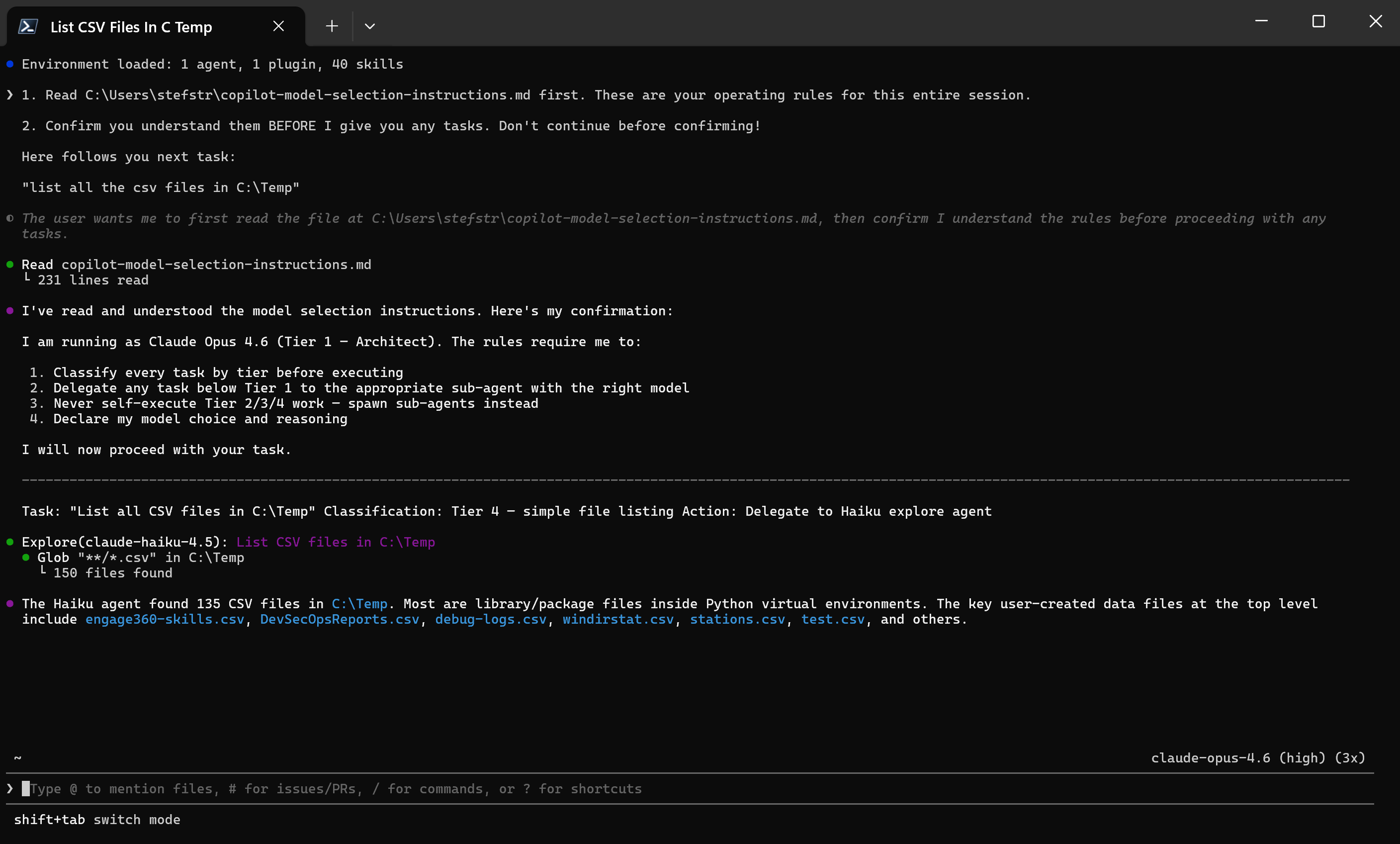

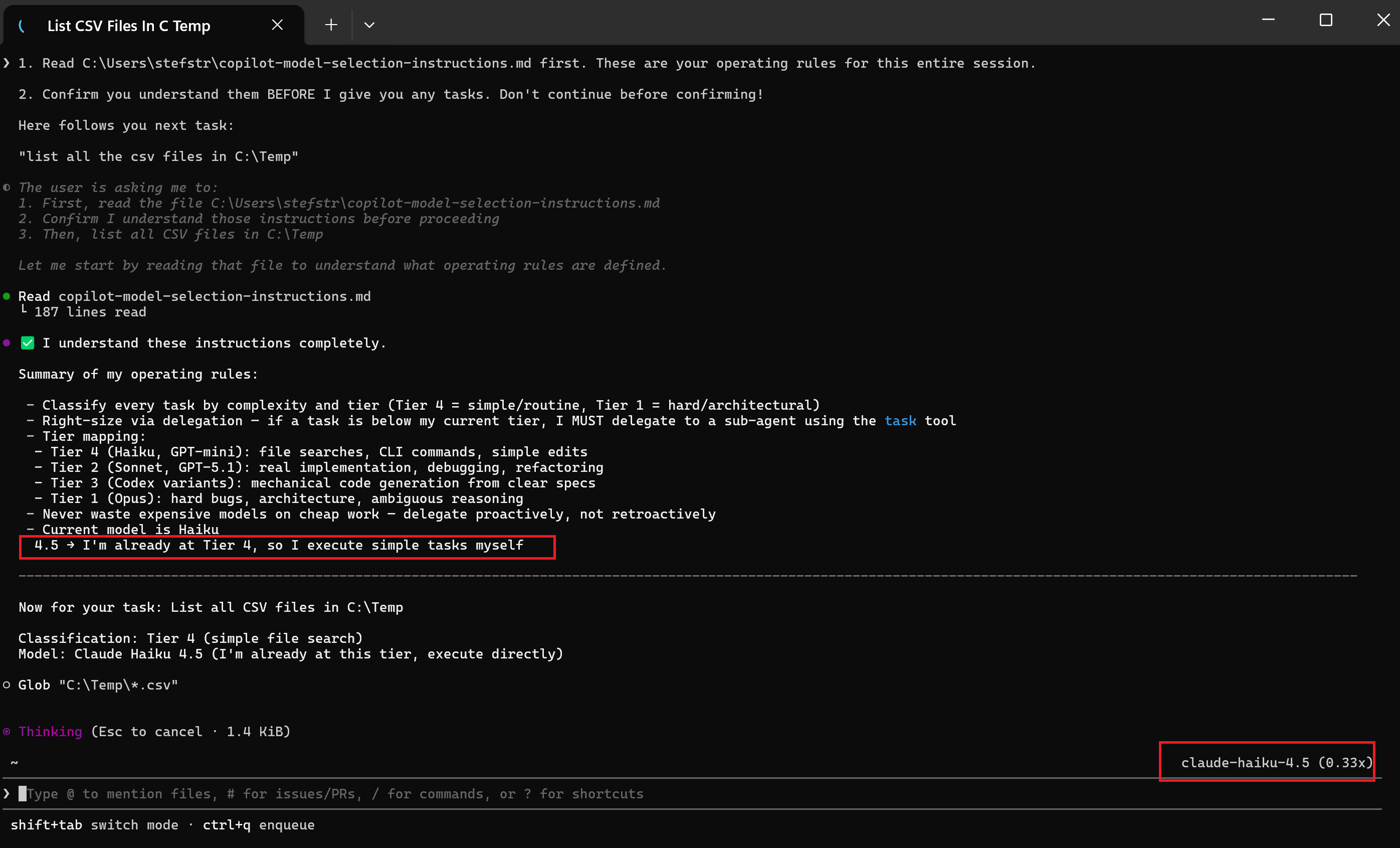
As expected, the model selected Haiku 4.5 for this task, which is the recommended model for simple, well-defined tasks.
Test 2: Complex Reasoning Task
1. Read C:\Users\stefstr\copilot-model-selection-instructions.md first. These are your operating rules for this entire session.

2. Confirm you understand them BEFORE I give you any tasks. Don't continue before confirming!

Here follows you next task:

"I have 12 coins, one is counterfeit (either heavier or lighter). Using a balance scale exactly 3 times, how do I identify the counterfeit coin and determine if it's heavier or lighter? Explain the complete decision tree."
Expected Outcome: The model should select a more capable, reasoning-focused model (e.g., Claude Opus 4.6 or Gemini 3 Pro) to analyze the test failure and provide insights on how to fix it.
Result:


Conclusion
The results of the tests aligned well with the self-assessments provided by the models. The model selection instructions derived from the LLM Council’s self-assessments proved effective in guiding the GitHub Copilot CLI to choose the most appropriate model for each task, validating the insights gathered from the council process.
Save Money by Using the Right Model
One of the biggest benefits of intelligent model selection is cost optimization. Premium reasoning models like Claude Opus or Gemini 3 Pro are significantly more expensive than lightweight models like Haiku 4.5 or GPT-mini. If you’re using a top-tier model for every task—including simple file listings, basic searches, or straightforward code edits—you’re essentially paying senior architect rates for intern-level work.
By matching model capability to task complexity:
- Simple tasks (file operations, grep searches, basic formatting) → Use Haiku/Mini models
- Standard coding tasks (implementing features, debugging) → Use Sonnet/GPT-5 models
- Complex reasoning (architecture decisions, multi-step analysis) → Use Opus/Pro models
This approach can reduce your token costs substantially while maintaining quality where it matters.
Automate Model Selection with Agent Instructions
The best part? You don’t have to manually choose the right model for each task. By providing agent instructions that define model selection rules, you can automate this entire process. The agent reads your instructions at the start of each session, classifies incoming tasks by complexity tier, and automatically delegates to the appropriate model—or spawns sub-agents using cheaper models for routine work.
This creates a self-optimizing workflow: expensive models handle strategy and complex reasoning, while cheaper models execute the straightforward tasks at scale. You get the intelligence when you need it, and the speed/cost savings when you don’t.
Hope this helps you understand which GitHub Copilot CLI model to use and when! Feel free to share your own experiences and insights in the comments below.