Scout + LLM-Wiki - Building a Second Brain That My Agents Can Read
Introduction
I have been running two experiments side by side for a while now. One is a personal knowledge wiki that I want both me and my agents to read. The other is Scout, Microsoft’s enterprise take on the OpenClaw-style always-on agent, where a small crew of named AI teammates helps me get work done. This week I finally wired the two together, and it turned out to be a lot more useful than I expected.
The change itself was small. I gave my Scout crew (Rik, Pieter, Tessa and a few others) read access to my wiki before they do anything. That is basically it. But it turned a set of generic assistants into teammates that actually know what I am working on. When I ask them for advice now, they answer with the context of what I already know and what I have already decided.
In this blog post I want to show you what the LLM-Wiki is, why I built it, and how it and Scout end up working together like a second brain. I am using Scout because that is what I have running, but you do not really need Scout for this. The same idea works for other OpenClaw setups: give your agents a readable knowledge base before you ask them to act.
What is Microsoft Scout?
Microsoft Scout is a preview desktop AI application for Windows and macOS. It is more than a chat window: it can take action across the things you already work in, like local files, shell commands, browser sessions, and Microsoft 365 data such as email, calendar, Teams, meetings, and OneDrive.
In the launch post, Omar Shahine, Corporate Vice President of Microsoft Scout, describes Scout as Microsoft’s first Autopilot agent: an always-on agent that can keep work moving in the background, act with its own governed identity, and operate within the permissions and policies set by you and your organization. The same post also says Scout is powered by OpenClaw open-source technology, with Microsoft adding enterprise identity, access control, policy conformance, and Microsoft 365 integration on top.
The basic pattern is simple: you describe what you need, Scout chooses the right tools, works through the task, and asks for approval before sensitive actions. That last part matters. Scout can write files, run commands, automate a browser, draft or send messages, and run scheduled background work, but the permission model lets you decide what it can do automatically and what still needs explicit approval.
Access is currently through the Frontier preview program. You need to be part of the preview and accept the terms of participation before you get early access. Since it is still preview software, capabilities and availability can change.
For my setup, the important feature is automation. Scout can run scheduled or trigger-based tasks in the background, remember preferences across conversations, and delegate work to specialized sub-agents. That is what turns it from “an assistant I ask questions” into a small operating layer for a named agent crew. In OpenClaw terms, Scout is one enterprise implementation of a broader pattern: local and cloud tools, governed actions, background autonomy, and agent workflows that can be adapted to different environments.
What is an LLM-Wiki?
An LLM-Wiki is a private, user-owned wiki that’s optimized for humans and agents at the same time. I got the idea from Andrej Karpathy’s LLM-Wiki pattern.
The idea is simple. Instead of spreading knowledge across notes apps, old chat histories, and decisions you half-remember, you keep one knowledge base in plain Markdown. The structure does two jobs at once: I can read and navigate it like a normal wiki, and my agents can pull it in as context so they reason with my knowledge instead of only their own.
My version started very simply. I copied Karpathy’s gist, used GitHub Copilot to turn it into the first shape of an LLM-Wiki, and then started feeding it content. At first that was manual: I put source material in a raw folder based on what I wanted in my knowledge base, then had Copilot and Scout turn those sources into structured notes.
Over time the wiki became more than a folder of notes. It now has concept notes, team notes, strategy notes, source summaries, and indexes that tie the pieces together. The new bit is that Scout can manage it too: it can ingest new content, update the structure, and read the wiki before helping me.
When I say “AI does the ingestion,” I don’t mean one fixed service. It depends where I am working. Sometimes the ingest command goes to Scout. Sometimes it goes to GitHub Copilot Chat in VS Code. Sometimes it is the GitHub Copilot app or a CLI agent. The role is the same either way: a human chooses what is worth capturing, and an AI agent turns that raw material into linked wiki pages.
Why this matters
A generic AI assistant knows a lot about the world and nothing about you. It has no idea what your projects are, what your priorities are, how you name things, or what you decided three weeks ago.
Point your agents at the wiki first and that changes. They start from your actual context, so the advice stops being textbook-generic. Instead of “here is how people usually do X”, I get “given what you already wrote about X, here is a sensible next step”. That second answer is the only one I really care about.
Scout and the LLM-Wiki in practice
So what does this look like in practice?
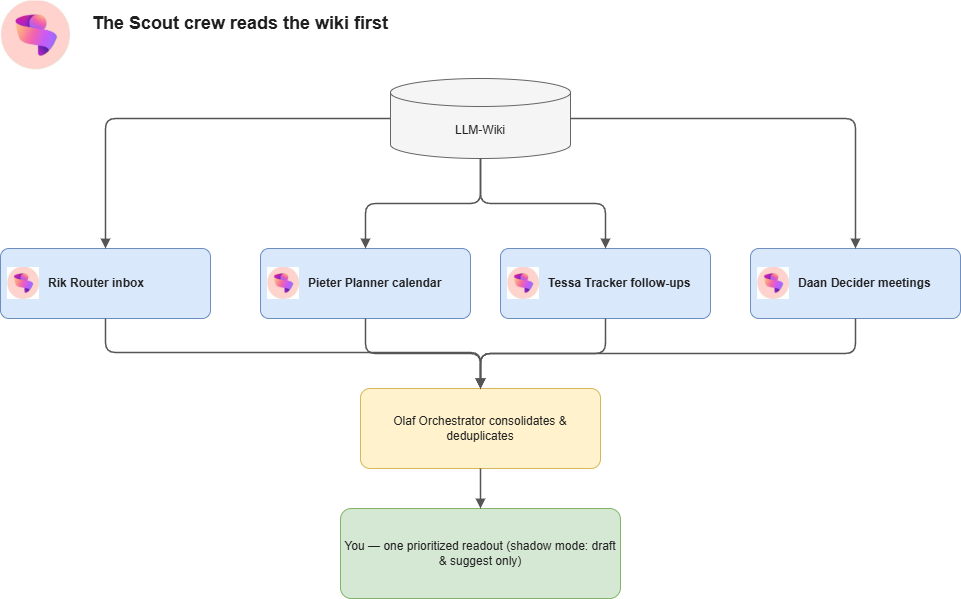
Most of the time it starts with a single prompt: I tell Scout to ingest a source into my LLM-Wiki. That source might be a PowerPoint deck, meeting notes, an email thread, a Teams conversation, or something I captured manually in Obsidian. Scout turns it into Markdown, reads the wiki structure, and updates the right places.
The prompt is one line, but the work behind it is not. Scout is the operator in the middle here: it takes the source material, converts it into agent-readable Markdown, reads the existing wiki structure, and then does the boring plumbing to fit the new material into the right places.
The LLM-Wiki process has a few steps:
- Add source material to
raw\. I do this manually when I take notes in Obsidian or save material I care about. Scout can also do it when I approve suggested content from email, Teams chats, or other work sources. - Ask an AI agent to ingest it. The agent might be Scout, VS Code GitHub Copilot Chat, the GitHub Copilot app, or a CLI coding agent. The exact harness changes; the wiki protocol stays the same.
- Create a source summary. The AI reads the raw source and writes a summary under
wiki\sources\, so there is a durable record of where the knowledge came from. - Update the entity pages. The AI routes the useful parts into the right people, projects, concepts, meetings, teams, and strategy pages.
- Update the navigation. The AI updates
wiki\index.md,wiki\overview.md, andwiki\log.md, so the new knowledge is findable and the change history stays visible. - Link everything together. Pages use Obsidian-style links like
[[Project Name]], so humans can browse the wiki and agents can follow the context graph. - Make it readable by agents. The final output is structured Markdown with links and context, so the Scout crew can read it before giving advice or preparing work.
That distinction matters. The wiki is the durable memory. The ingesting AI is the hands and judgment layer that turns messy source material into that memory. Scout is one of those hands, and it is also the automation layer that keeps suggesting new material and makes the crew read the wiki before acting.
I still decide what gets in. Scout also runs a weekly automation that scans recent email and Teams conversations for durable, wiki-worthy candidates. It does not ingest automatically. It gives me a shortlist, I pick what is actually worth keeping, and only then does the selected material get routed into the wiki. That keeps the knowledge base intentional instead of turning it into a landfill with better search.
This pattern is not limited to manually ingested documents. A lot of useful team knowledge starts in conversation: Teams threads, design discussions, bug triage, customer feedback, status updates, and quick discoveries. Chat is great for the moment, but poor as long-term memory.
One useful OpenClaw-style pattern is to mirror accessible team conversations into a local, searchable archive, and then let agents summarize the themes, decisions, blockers and follow-ups. What matters here is the loop, not the crawler: conversations become searchable context, agents summarize what changed, and the durable bits get written back into the LLM-Wiki.
That keeps the wiki from depending only on manual note-taking. Documents, meetings, emails, and team conversations can all feed the same memory layer, as long as ingestion stays permission-aware, read-only by default, and selective about what becomes permanent.
The output is a small set of linked Markdown changes. A typical ingest creates a source summary, adds or updates a concept note or two, updates the relevant project, team, person or strategy pages, adds links back into the index, and records the change in the wiki log. By the end, the source is no longer just a file I might forget about. It has become part of the context graph my agents can use.
The Scout crew
The crew is a handful of named teammates, each with a role, a schedule, and a clear boundary. I update the model daily and expect it to keep changing as the operating model gets sharper.
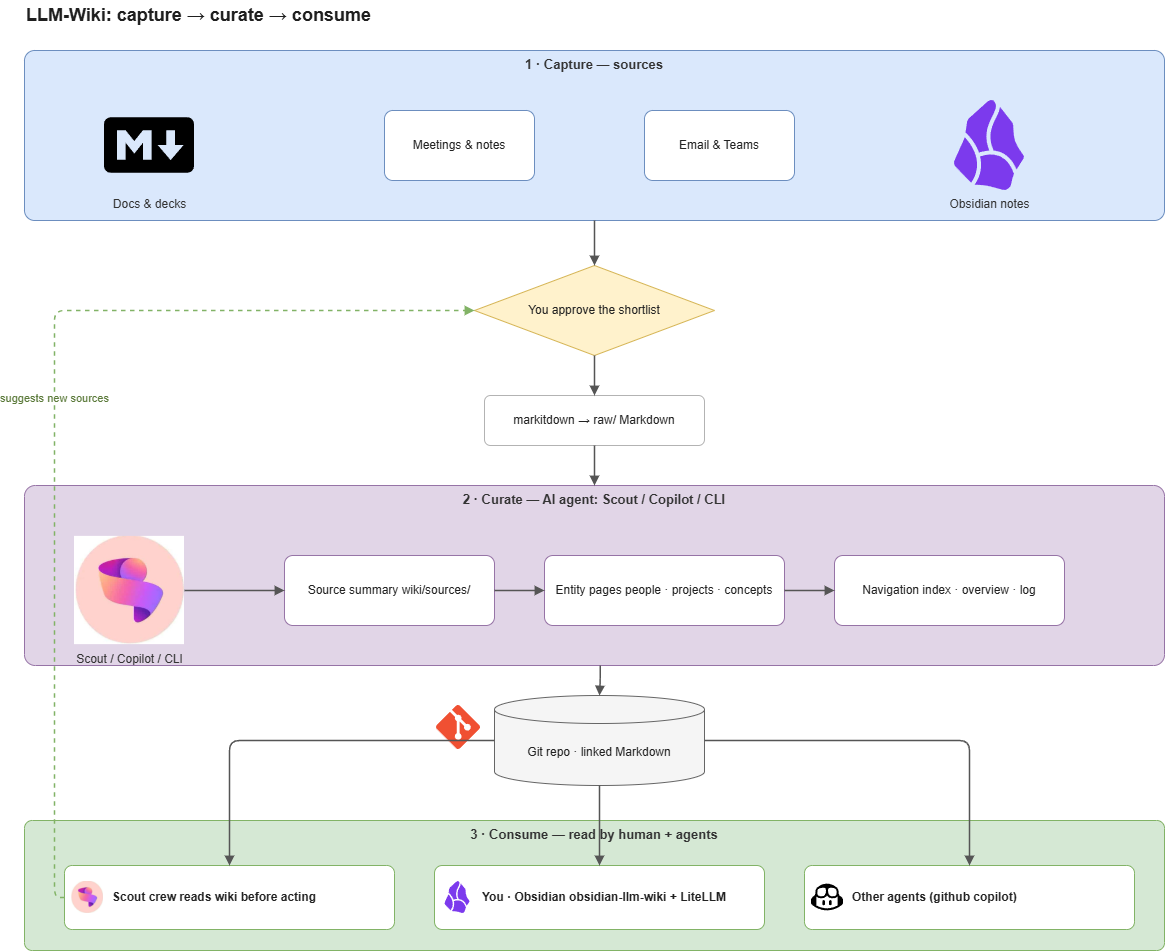
The crew model came from a separate thread. Lisa Clark shared how to create and a crew of Scout agents and I used that as inspiration, then created a number of named agents in Scout and gave them one extra rule: before answering my questions or preparing their briefs, look at the LLM-Wiki first. That is the part that makes them feel like an actual crew with shared context instead of a handful of independent bots.
The important bit is that these are not vague “AI helpers”. They are Scout automations with names and jobs:
- Rik Router is the inbox keeper. Every weekday morning he looks for VIP or time-sensitive mail, separates signal from noise, and prepares routine reply drafts for review.
- Pieter Planner is the calendar and prep agent. He looks at the day ahead, flags conflicts, explains why meetings matter, and tells me what I need to prepare.
- Tessa Tracker is the follow-up agent. Late in the day she catches open commitments, stalled threads, and people waiting on me.
- Daan Decider helps with one-off meetings. He looks at non-recurring meetings and recommends whether to attend, skip, prepare, or reschedule.
- Olaf Orchestrator sits above the crew as a coordinator. He consolidates what the others found, deduplicates memory candidates, and turns scattered agent output into one prioritized readout.
All of them start in shadow mode. That means draft, suggest, and notify only. They do not send mail, book meetings, decline invites, move messages, archive things, or update memory without explicit approval. Trust is progressive: first show useful judgment, then maybe earn one small extra permission later. One agent, one capability, one decision at a time.
The useful part isn’t that any one of them is clever on its own. It’s that they read the wiki before they act. Everyone starts from the same shared brain, so their advice lines up with each other and with everything I’ve written down before.
Why I like this setup
A few things stand out after living with this setup for a bit.
The first is that it compounds. Every ingest makes the next question a little better answered, because the wiki gets richer and every agent that reads it inherits that.
The second is that it is just Markdown. There is no lock-in and no proprietary format. I own the files, and anything that can read text can use them.
And finally it closes the loop for me. Capturing a deck and then asking the crew about it happen in the same place, so I am no longer bouncing between a notes app and my agents. It is private, it is mine, and it is shaped around how I actually work.
There is also an Obsidian angle. If you use Obsidian for your LLM-Wiki, the obsidian-llm-wiki plugin can make the same pattern usable inside the vault. I have it wired through a local LiteLLM proxy to GitHub Copilot-backed models, so I can ask questions from inside Obsidian as well as through Scout. Scout is still my automation layer, but Obsidian gives me a nice human interface for browsing and questioning the wiki directly.
Conclusion
Wiring the LLM-Wiki to a Scout crew turned my knowledge base from a passive archive into something I use every day. I write things down once, in Markdown, and both I and my agents can read them. Adding new material is a one-line prompt, and getting project-aware advice is just a matter of talking to the crew.
If you already keep notes for yourself, this is a small change worth trying: structure them so your agents can read them too, then let the crew pick your brain. Whether that crew runs in Scout or another OpenClaw-based setup matters less than the loop: capture useful knowledge, turn it into linked Markdown, and make agents read it before they act.