From Jev to Microsoft-Decision-1
Introduction
There has been quite some hype about Jev AI, one of the first “new” decision models. If we read their blog post “Jev: The System One Model for Fast, Calibrated AI Decisions”, they called their decision model a System One Model, which they got from the two modes of human thinking, where System 1 is fast, intuitive, and automatic. E.g. you use this to decide if an email is spam or not. And System 2 is according to psychologist Daniel Kahneman slow, deliberate, and reflective. You use it to write an essay, solve a proof, or debug a race condition. It requires sustained attention and working memory.
The ‘traditional’ Large Language Models (LLMs) we know are system 2 machines. And now there is a ‘new’ AI Model which are being called decision models (System 1). It takes a structured input state and returns a typed decision, no reasoning chain required.
In this blog post I want to explore what decision models are and when we can use these decision models.
What is a decision model
According to the announcement of Microsoft's decision model called Microsoft-Decision-1, decision models are purpose-built to deliver structured outputs that software can immediately act on. They perform classification and decision-scoring tasks at low cost, low latency, and high performance.
Let’s look at some of the statements about decision models in more detail. They deliver structured output that software can act on. Why is it important to get structured output? If you want the output of an AI Model to be consumed by software, structured output becomes predictable and machine-readable. Software can validate it, extract specific values, and pass them directly into APIs, databases, or workflows without trying to interpret free-form text. This makes automation more reliable and reduces parsing errors. To be fair you can also instruct a LLM to structure the output. But a LLM can hallucinate, incorrectly format the JSON, so it’s less reliable than a decision model.
Then there is also the statement that decision models allow software to act immediately. For that, a decision model needs low latency. A decision model can be faster than a traditional LLM because it solves a constrained problem, evaluates a small set of options and returns a short, structured result. This requires less computation, which can reduce latency and cost. Parallel processing provides a separate benefit: independent decisions, such as classifying hundreds of requests, can often be processed concurrently. This increases throughput, but it does not make an individual decision faster. When you use structured decisions in software or agents, you don’t want the application to wait several seconds before it can take the next action. Low latency makes real-time automated decision-making possible, while parallel processing helps the system handle more decisions at once.
How a decision model is structured
As mentioned before a decision model is designed to return structured, probabilistic answers. It supports three question types.
| Type | What it returns | Example use |
|---|---|---|
| noul | Probability from 0 to 1 that a statement is true | Determine whether a transaction is potentially fraudulent |
| choice | One selected option, with probabilities | Route an incident to networking, security, storage, or application support |
| score | A probability-weighted score across ordered levels | Rate an AI response from 1 — poor to 5 — excellent against a quality rubric |
Let’s run some tests on the decision models I deployed in Unsloth Studio (Laya) and Microsoft Foundry (Decision-1) using the LLM command-line tool from Simon Willison.
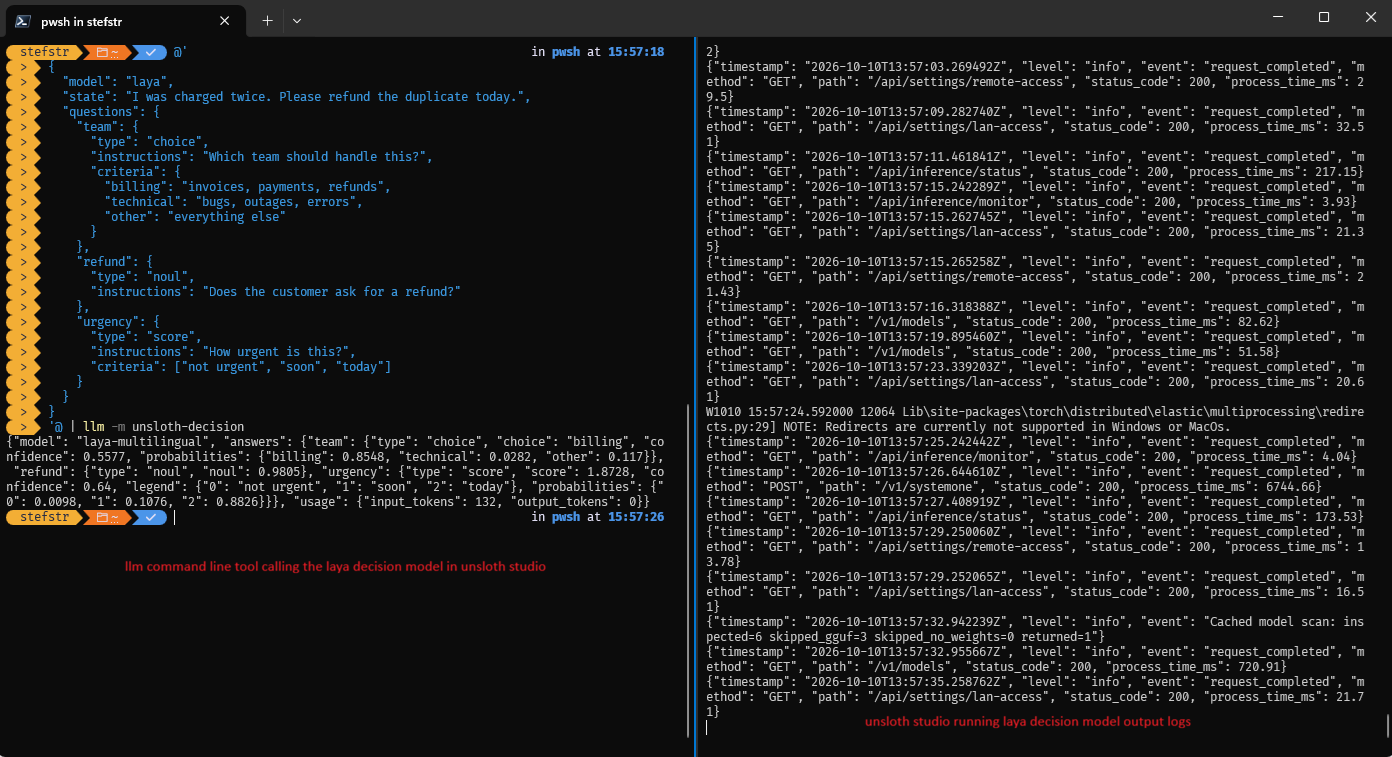
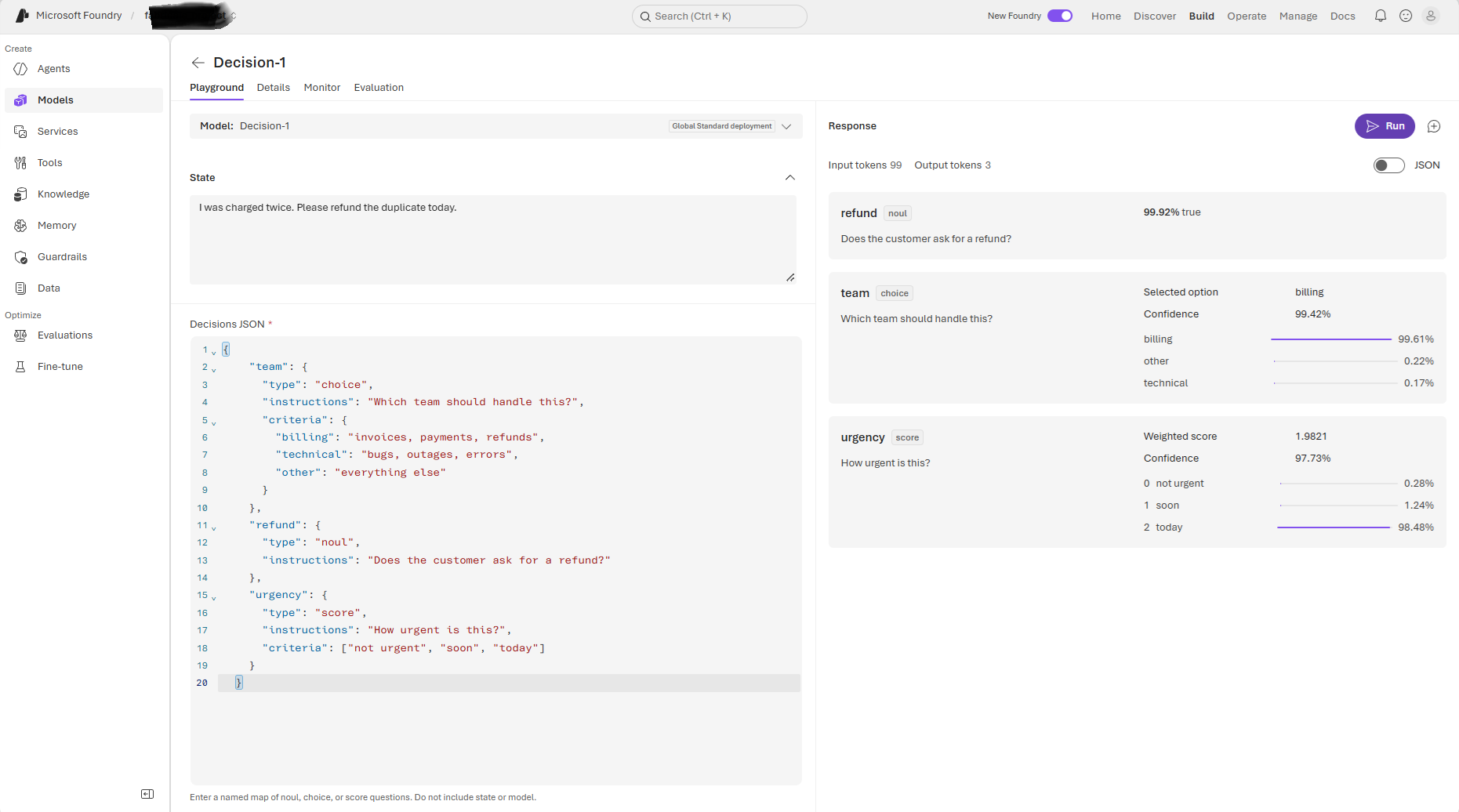
Both decision models answer the following questions based on the input state:
“I was charged twice. Please refund the duplicate today.”
Response from Unsloth Laya:
| Type | Instruction | Result |
|---|---|---|
| noul | Does the customer ask for a refund? | true (98.05%) |
| choice | Which team should handle this? | billing (85.48%) |
| score | How urgent is this? | today (64.00%) |
Response from Microsoft Decision-1:
| Type | Instruction | Result |
|---|---|---|
| noul | Does the customer ask for a refund? | true (99.92%) |
| choice | Which team should handle this? | billing (99.61%) |
| score | How urgent is this? | today (98.48%) |
When to use a decision model
Classification is the key use case for decision models. When you need fast, repeated, structured decisions, go for a decision model.
Decision models can be used anywhere software must select from a defined set of options. An agent can use one to decide whether to continue, retry, call a tool, switch models, or ask a human for help. Other examples include routing incidents, labeling customer feedback, validating data, ranking search results, judging AI responses, screening content for safety, and selecting the next action in a user interface or scientific workflow. In each case, the model returns a score or probability for the available options, allowing the application to make a fast and controlled decision.
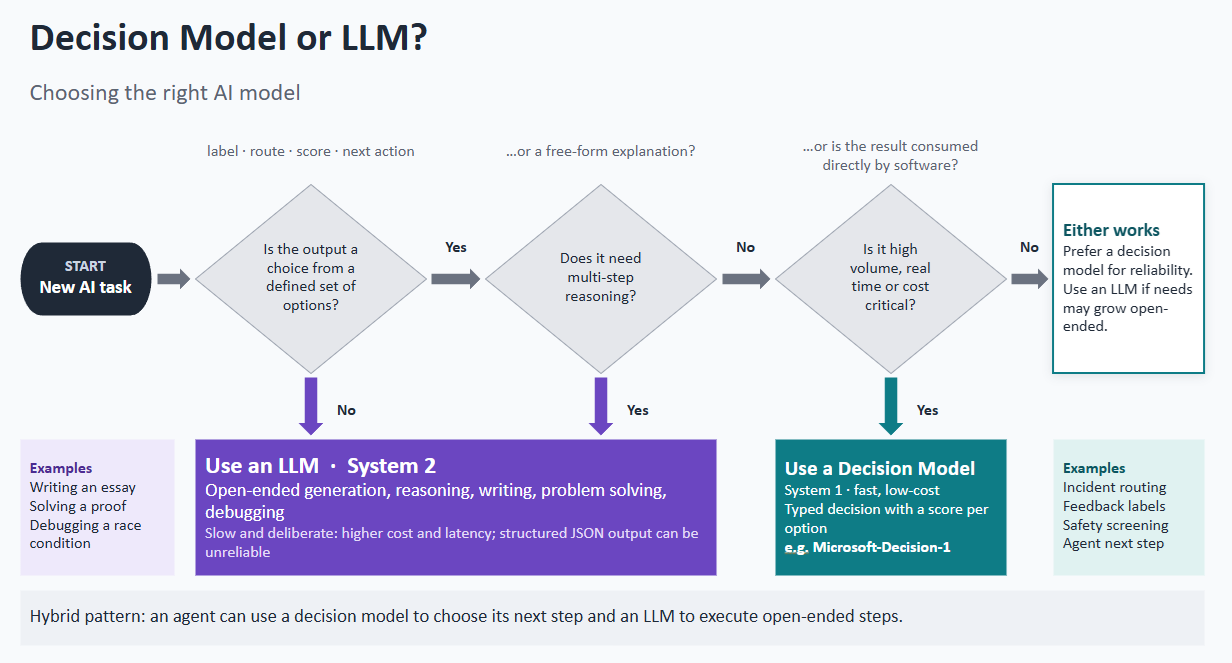
[image generated with Copilot CoWork]
Comparing a decision model with an LLM
We now understand how a decision model works. Let’s see how this differs when using a ‘regular’ LLM to answer the same questions about the customer’s request for a refund after being charged twice.
prompt:
1
2
3
4
5
6
7
8
9
Make the following decisions for the following customer request:

"I was charged twice. Please refund the duplicate today"

- Does the customer ask for a refund?
- Which team should handle this?
- How urgent is this

Return only valid JSON using the supplied decision format. Each decision must contain a unique id, a type, a result, a confidence between 0 and 1, and probabilities for every valid outcome. Supported types are boolean, choice, and score. All probabilities for a decision must add up to 1. For a choice or boolean decision, confidence must equal the probability assigned to the selected result. Do not add explanations or Markdown outside the JSON.
In Unsloth Studio, I loaded the LLM model “gemma-4-12B-it-qat-GGUF.” The result was the same as when I used the decision models, but it took much longer (4m 18s).
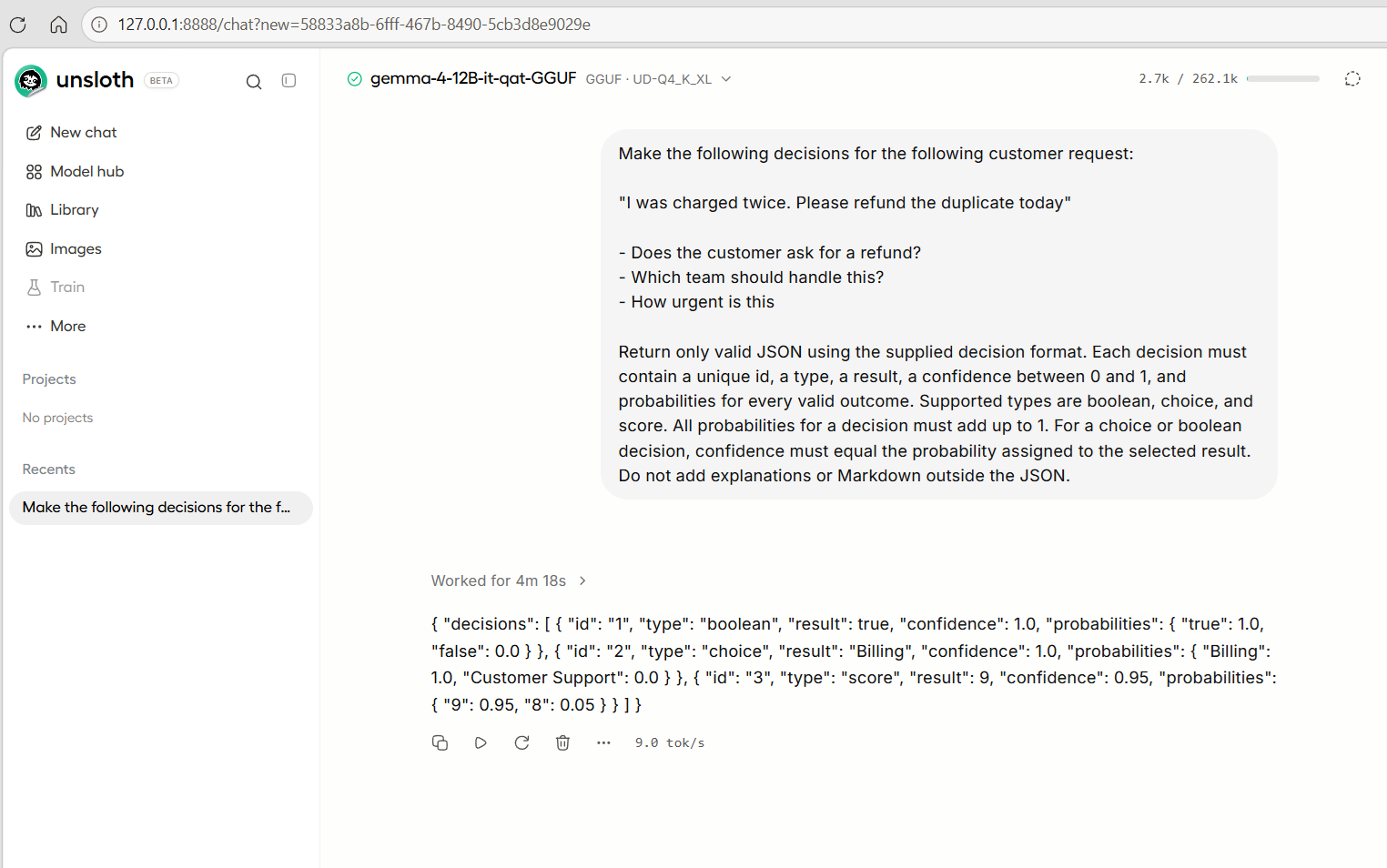
In Microsoft Foundry I used the same prompt and an instruction that stated “You are an AI decisions agent that helps make decisions” in the LLM Model gpt-4o and this was the result.
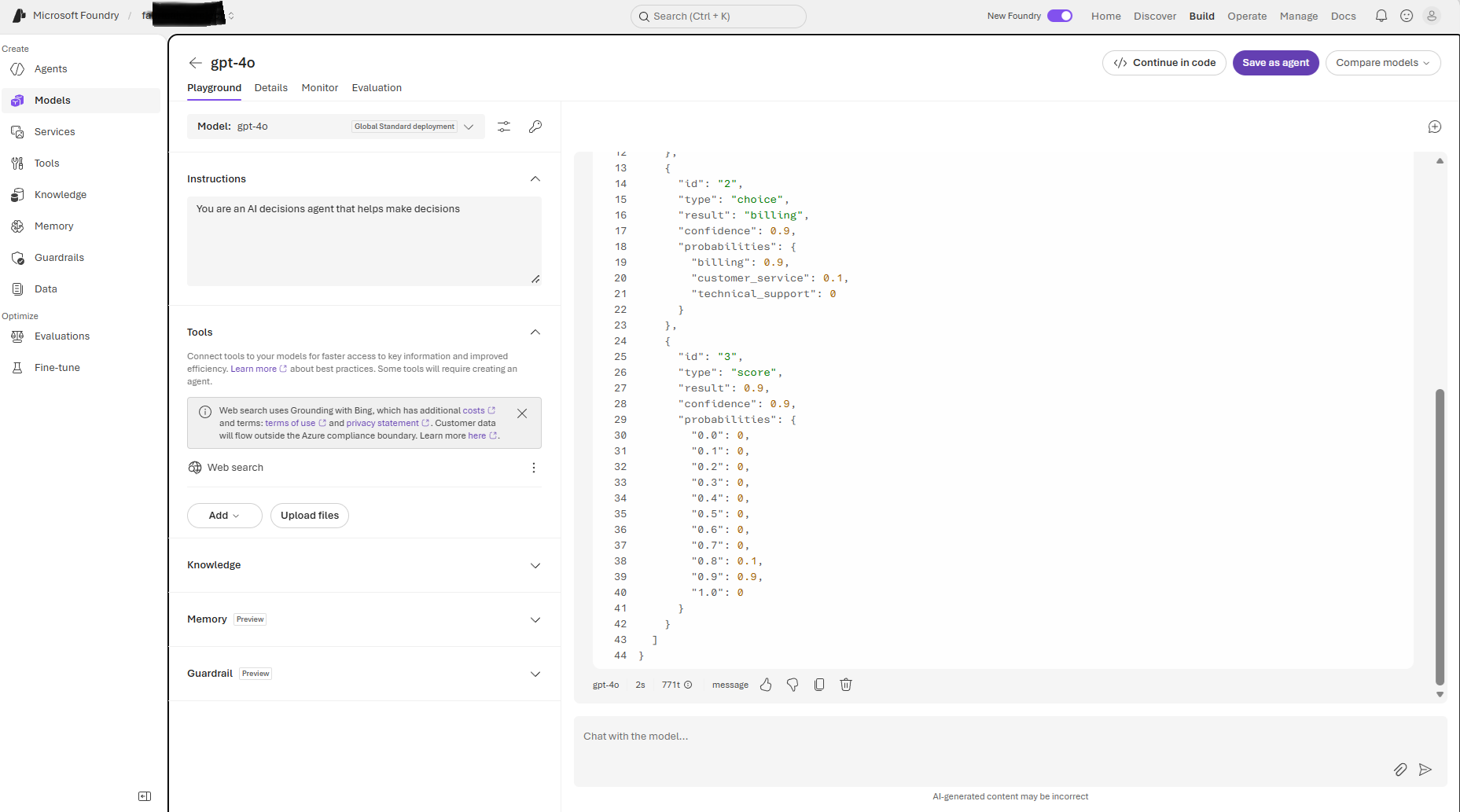
However, when I ran the same prompt multiple times, different values were returned. That did not happen when I used the decision models.
Using decision models in software and agents
Let’s imagine the following ticketing system.
- A customer submits a support request.
- The Decision Model classifies the request.
- The ticketing system routes it to the appropriate team.
- The system assigns a priority.
- The system selects an approved email template.
- The customer immediately receives a relevant acknowledgement.
- Low-confidence or high-risk decisions are sent for human review.
The ticketing system then performs deterministic actions:
1
2
3
4
5
6
7
8
9
10
11
12
13
14
15
Create ticket
    ↓
Ask Decision Model
    ↓
Validate confidence scores
    ↓
Route ticket to Billing
    ↓
Set priority to High
    ↓
Select approved email template
    ↓
Insert safe ticket details
    ↓
Send acknowledgement email
Decision ticketing lab
I built a working GitHub Copilot App canvas demonstrating the boundary between a decision model and deterministic software. Customer intake is followed by three typed decisions, a confidence/risk gate, animated color-coded team routing, priority assignment, approved template selection, safe plain-text personalization and a simulated email outbox.
The model never writes the acknowledgement, issues a refund or chooses an arbitrary action. Nothing sends real email or creates tickets in an external ticketing product.
The GitHub Copilot App canvas uses the local decision model running in Unsloth Studio.
Here is the video I had the GitHub Copilot App create, showing the Ticketing Lab running live.
Conclusion
Decision Models do not replace LLMs. They complement them. Use a Decision Model for fast, bounded and repeatable decisions. Use an LLM when a task requires generation, synthesis or open-ended reasoning.
In production systems, the strongest design often combines both: a Decision Model controls or routes the workflow, while an LLM handles tasks that require flexible language or deeper reasoning.
I hope you learned something new. Let me know in the comments what you think.
References
- Microsoft-Decision-1 announcement
- Foundry model catalog
- SystemOne integration example
- Unsloth Decision API setup and authentication
- OpenAI Decisions API vs. Jev: A Practical Guide to Decision Models
About this article
I created this article together with AI. I provided the ideas, experiments and practical experience, while AI helped me organize the content, improve the writing and create supporting examples and visuals. I reviewed and approved the final result.
#memyselfandai